WPSApp Pro1.7.07
Publisher Description


Check the security of your WiFi network. WPS protocol. (WITHOUT ADS)
WPSApp Pro is the version without ads of WPSApp, checks the security of your network using WPS protocol.
This protocol allows you to connect to a WiFi network using an 8-digit pin number that usually is predefined in the router, the problem is that the pin of many routers from different companies is known or is known how to calculate it.
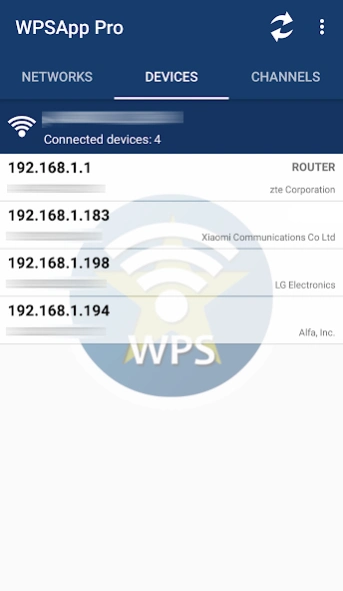
This app uses these pins to try the connection and check if the network is vulnerable. It implements several known algorithms for pin generation and some default pins. Also calculates default key for some routers, allows you to view WiFi passwords stored on the device, scans the devices connected to your network and analyzes the quality of the WiFi channels.
Use is very simple, when scanning networks around us, you will see networks with a red cross, these are "secure" networks, they have disabled the WPS protocol and default password is unknown.
Those that appear with a question mark have enabled the WPS protocol, but the pin is unknown, in this case the application allows you to test the most common.
Finally, those with a green tick are most likely vulnerable, have the WPS protocol enabled and the connection pin is known. It may also be that the router has WPS disabled, but the password is known, in this case it also appears in green and can be connected to the key.
You just need to be a Root user to see the passwords, to connect on Android 9/10 and for some extra function.
NOTICE: Not all networks are vulnerable and that the network appears as such does not guarantee 100% that it is, several companies have updated firmware of their routers to correct the fault.
TRY IT ON YOUR NETWORK AND IF YOU ARE VULNERABLE... REMEDY IT. Turn off WPS and change password for a strong and personalized.
I AM NOT RESPONSIBLE FOR ANY MISUSE, INTRUSION INTO FOREIGN NETWORKS IS PUNISHABLE BY LAW.
From Android 6 (Marshmallow) it is necessary to grant location permissions. It is a new requirement added by Google in this version. More information in: https://developer.android.com/about/versions/marshmallow/android-6.0-changes.html#behavior-hardware-id
Some Samsung models use encryption and do not show real passwords, they show a long series of hexadecimal digits. Look for information on the internet or contact me if you want to know how to decrypt them.
Pin connection does not work on LG models with Android 7 (Nougat). It's a problem with LG's own software.
Please understand how the application works before giving an evaluation.
Send any proposal, failure or comment to wpsapp.app@gmail.com, thanks.
Acknowledgments:
Zhao Chunsheng, Stefan Viehböck, Justin Oberdorf, Kcdtv, Mario Fernández González (Compota), Patcher, Coeman76, Craig, Wifi-Libre, Lampiweb, David Jenne, Alessandro Arias, Sinan Soytürk, Ehab HoOoba, drygdryg, Daniel Mota de Aguiar Rodrigues.
About WPSApp Pro
The company that develops WPSApp Pro is TheMauSoft. The latest version released by its developer is 1.7.07. This app was rated by 2 users of our site and has an average rating of 3.8.
To install WPSApp Pro on your Android device, just click the green Continue To App button above to start the installation process. The app is listed on our website since 2026-08-09 and was downloaded 11,665 times. We have already checked if the download link is safe, however for your own protection we recommend that you scan the downloaded app with your antivirus. Your antivirus may detect the WPSApp Pro as malware as malware if the download link to com.themausoft.wpsapppro is broken.
How to install WPSApp Pro on your Android device:
- Click on the Continue To App button on our website. This will redirect you to Google Play.
- Once the WPSApp Pro is shown in the Google Play listing of your Android device, you can start its download and installation. Tap on the Install button located below the search bar and to the right of the app icon.
- A pop-up window with the permissions required by WPSApp Pro will be shown. Click on Accept to continue the process.
- WPSApp Pro will be downloaded onto your device, displaying a progress. Once the download completes, the installation will start and you'll get a notification after the installation is finished.
Program Details
System requirements
Download information
Pricing
Version History
version 1.7.07
posted on 2026-08-09
v1.7.07
- Bug fixes.
version 1.7.06
posted on 2026-06-25
v1.7.06
- New default passwords (Asus)
- Bug fixes.
version 1.7.05
posted on 2026-06-13
v1.7.05
- New generic algorithm for PINs (Thanks to Compota)
- New default passwords (MitraStar, ZTE, Zyxel and D-Link)
- WPA3 encryption added to network scanning.
- Bug fixes.
- Updated libraries.
version 1.7.04
posted on 2025-12-19
v1.7.04
- Bug fixes (Pixie Dust included).
- Some new vulnerable routers.
v1.7.03
- Added support for Shizuku (To view saved passwords and see the MAC address in network device scanning, for now) (BETA).
- Now the backup of saved networks is done in ‘/Android/media/…’.
- WPS information available without root.
- Bug fixes.
- Updated libraries.
- Updated OUI.
version 1.7.03
posted on 2025-10-08
v1.7.03
- Added support for Shizuku (To view saved passwords and see the MAC address in network device scanning, for now) (BETA).
- Now the backup of saved networks is done in ‘/Android/media/…’.
- WPS information available without root.
- Bug fixes.
- Updated libraries.
- Updated OUI.
version 1.6.71
posted on 2025-08-13
v1.6.71
- Bug fixes.
- Some new vulnerable routers.
- Updated libraries.
version 1.6.70
posted on 2024-08-21
v1.6.70
- Updated libraries.
version 1.6.69
posted on 2024-01-15
v1.6.69
- Some new vulnerable routers.
- GDPR compliance in Europe and the UK.
version 1.6.67
posted on 2023-10-23
v1.6.67
- Bug fixes for Android 13.
- Code optimization.
version 1.6.63
posted on 2023-02-16
v1.6.63
- New pins and new vulnerable routers.
- Bug fixes.
